


Page 664 - General Catalogue
P. 664
Zanotti


          Touch control


                                                                                   SET
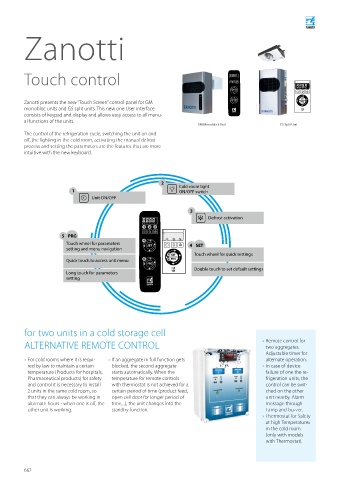
          Zanotti presents the new “Touch Screen” control panel for GM             PRG                     SET
                                                                                                           PRG
          monobloc units and GS split units. This new one User interface
          consists of keypad and display and allows easy access to all manu-
          al functions of the units.
                                                                      GM Monoblock Unit            GS Split Unit
          The control of the refrigeration cycle, switching the unit on and
          off, the lighting in the cold room, activating the manual defrost
          process and setting the parameters are the features that are more
          intuitive with the new keyboard.


                                                          2     Cold room light
                          1                                     ON/OFF switch
                                 Unit ON/OFF

                                                                    3
                                                                          Defrost activation
                                                   1  2  3
                       5 PRG
                                                   4       1  2  3
                        Touch wheel for parameters   SET            4  SET
                        setting and menu navigation
                                                            4  SET   Touch wheel for quick settings
                        Quick touch to access unit menu  5  5  PRG
                                                     PRG
                                                                     Double touch to set default settings
                        Long touch for parameters
                        setting


          for two units in a cold storage cell
          ALTERNATIVE REMOTE CONTROL                                                            › Remote control for
                                                                                              two aggregates.
                                                                                              Adjustable timer for
            › For cold rooms where it is requi-    › If an aggregate in full function gets    alternate operation.
           red by law to maintain a certain   blocked, the second aggregate                     › In case of device
           temperature (Products for hospitals,   starts automatically. When the              failure of one the re-
           Pharmaceutical products) for safety   temperature for remote controls              frigeration units, the
           and control it is necessary to install   with  thermostat is not achieved for a    control can be swit-
           2 units in the same cold room, so   certain period of time (product feed,          ched on the other
           that they can always be working in   open cell door for longer period of           unit nearby. Alarm
           alternate hours - when one is off, the   time,...), the unit changes into the      message through
           other unit is working.       standby function.                                     Lamp and buzzer.
                                                                                                › Thermostat for Safety
                                                                                              at high Temperatures
                                                                                              in the cold room
                                                                                              (only with models
                                                                                              with Thermostat).


          662

